

Description
Download My Memorial Hermann – Healthcare Management, Medical Records, Appointment Scheduling, Secure Messaging, Patient Portal
Overview
My Memorial Hermann is a digital healthcare platform developed by the Memorial Hermann Healthcare System to enhance patient engagement and streamline access to medical services. Designed for individuals seeking a unified solution for managing their health, the platform supports appointment scheduling—both in-person and virtual—on short notice, allowing users to adapt quickly to changing healthcare needs. It enables secure access to medical records, including visit summaries, medications, and test results, empowering patients to stay informed and involved in their care. The platform also facilitates pre-appointment paperwork completion, reducing wait times and improving clinic efficiency. Users can securely message their care teams, receive timely responses, and stay updated on treatment plans. Additional features include arrival notification, personalized health journey support, and integration with health and fitness apps such as Apple Health, enabling users to track and share wellness data. The platform serves patients across the greater Houston area, connecting them with primary care providers, specialty physicians, hospitals, and mental health services. It is accessible via web and mobile devices, ensuring continuity of care regardless of location. The developer did not provide additional details about the organization’s background beyond its role in healthcare delivery. Real-world usage scenarios include managing chronic conditions, preparing for routine check-ups, coordinating specialist visits, and maintaining long-term health tracking. My Memorial Hermann aims to reduce administrative burdens while promoting proactive health management.
Key Features & Capabilities
- Appointment Scheduling – Users can book in-person or virtual appointments with healthcare providers on short notice, improving access to timely care.
- Secure Medical Records Access – Patients can view visit notes, medications, lab results, and other clinical information in a secure, centralized location.
- Pre-Appointment Paperwork – Forms and consent documents can be completed before visits, minimizing delays during clinic appointments.
- Secure Messaging with Care Teams – A private communication channel allows patients to ask questions, request prescription refills, and receive updates directly from providers.
- Arrival Notification – Users can notify providers when they’ve arrived at a clinic, helping streamline check-in processes.
- Health Data Integration – The platform supports importing health and fitness data from apps like Apple Health, enabling a more comprehensive view of personal wellness.
- Personalized Health Support – Tailored resources and guidance are provided based on individual health needs and care journeys.
These features collectively support proactive healthcare management. For example, a patient managing diabetes can schedule a follow-up appointment, review recent glucose test results, upload data from a fitness tracker, and message their provider with questions—all within a single interface. Similarly, a caregiver coordinating care for a family member can access records, track medication schedules, and stay informed through secure messages. The platform’s design emphasizes usability, ensuring that patients of all ages can navigate essential functions without technical barriers. It is intended to reduce inefficiencies in traditional healthcare workflows and promote continuity of care across multiple providers and settings.
User Interface, Workflow & Performance
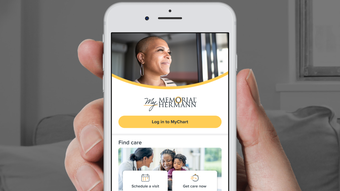
The user interface of My Memorial Hermann is structured to prioritize clarity and accessibility, with a clean layout that organizes key functions such as appointments, messages, records, and health data under intuitive navigation tabs. The workflow follows a logical sequence: users log in, access their dashboard, and proceed to relevant sections based on their immediate needs. The design supports touch and mouse interactions, making it usable across desktop and mobile devices. Navigation is consistent across platforms, ensuring a seamless experience whether accessing the service via web browser or mobile app. The developer did not specify resource usage details, so exact performance metrics such as CPU or RAM behavior remain unknown. General software behavior patterns suggest responsive performance under normal usage conditions, but actual performance may vary based on network speed and device capabilities. Stability is assumed to be maintained through regular updates, though no specific information on crash rates or downtime was provided. The platform appears optimized for reliability during peak usage periods, such as appointment booking windows. Overall, the interface is designed to minimize cognitive load, allowing users to complete tasks efficiently without confusion or unnecessary steps.
Compatibility & System Requirements
My Memorial Hermann is available as a web-based application and mobile app for iOS and Android devices. The platform supports current versions of major operating systems, though exact compatibility details were not specified. Installation size and hardware requirements were not listed by the developer. The application is designed to function across a range of devices, including smartphones, tablets, and desktop computers. Users are advised to ensure their device meets standard web browsing requirements for secure access. The developer did not provide additional system requirements, so users should refer to their device’s default capabilities for optimal performance. Compatibility information is limited to platform availability, with no mention of support for legacy systems or alternative operating environments. For users seeking to access the service offline, the mobile app may offer limited functionality, but specific details were not provided. Overall, the platform appears built with cross-device accessibility in mind, prioritizing broad reach across modern digital devices.
Pros and Cons
Pros
- Centralized access to medical records, appointments, and care team communication.
- Supports both virtual and in-person appointment scheduling with short-notice booking.
- Secure integration with health and fitness tracking apps like Apple Health.
- Streamlined pre-appointment form completion reduces clinic wait times.
- Personalized health journey support enhances patient engagement.
- Available on web and mobile platforms for continuous access.
Cons
- Exact system requirements and performance data were not disclosed.
- Offline functionality details are unclear.
- Platform availability is limited to the greater Houston area.
- Integration with non-Apple health apps was not confirmed.
- No public information on update frequency or version history.
FAQ Section
Is My Memorial Hermann available on Windows and Mac?
Yes, the platform is accessible via web browser on both Windows and Mac operating systems, providing a desktop experience without requiring a dedicated application.
Is the platform secure and compliant with healthcare regulations?
Yes, My Memorial Hermann is designed with patient privacy and data security in mind, adhering to healthcare compliance standards such as HIPAA to protect sensitive medical information.
How often is the software updated?
The platform is continuously updated to improve functionality and user experience, though specific update frequency details were not provided.
What type of license or subscription is required?
Access to My Memorial Hermann is typically provided at no cost to patients within the Memorial Hermann Healthcare System, as it is offered as a patient service.
Can I use My Memorial Hermann without an internet connection?
While the web and mobile versions require an active internet connection for full functionality, limited offline access may be available for certain features. Specific details were not disclosed.
Final Thoughts + CTA
My Memorial Hermann stands out as a comprehensive digital health solution tailored to patients within the Memorial Hermann Healthcare System. By integrating appointment scheduling, secure messaging, medical record access, and health data tracking into a single platform, it significantly reduces administrative friction in healthcare management. Its user-friendly interface and cross-device availability make it accessible to a broad demographic, including older adults and individuals managing chronic conditions. While detailed technical specifications and performance metrics are not available, the platform’s design reflects a strong commitment to usability and patient-centered care. For individuals in the greater Houston area seeking a reliable, secure, and convenient way to manage their health, My Memorial Hermann offers a compelling digital companion. It empowers users to take control of their care journey with confidence and ease. Download My Memorial Hermann now.
Guides & Tutorials for My Memorial Hermann
How to install My Memorial Hermann
- Click the Preview / Download button above.
- Once redirected, accept the terms and click Install.
- Wait for the My Memorial Hermann download to finish on your device.
How to use My Memorial Hermann
This software is primarily used for its core features described above. Open the app after installation to explore its capabilities.
User Reviews for My Memorial Hermann 0
No reviews found





